For your team
Organize support references around the questions they answer
Support references are easier to find when their titles match the question you are trying to answer. Collect official guidance in linqlo, then note the relevant section and the conditions to check before using it in a reply.

AI-generated illustration. It contains no real customer information or support requests and is not the linqlo interface.
Spend less time finding the same help page again
A settings question arrives, and someone starts at the help-center homepage, opening menu after menu. A different teammate finds an older guide. When reference locations live mainly in people’s memories, small searches become repeated work.
Copying the last answer is not always the solution. Instructions that matched one person’s plan or interface may not apply to the next person. Start by making the official evidence easier to find.
This guide uses a fictional service and three question types: finding settings, locating the official billing contact, and finding guidance when something cannot be used. No real customer or support-ticket content is needed.
Use the question as the title’s starting point
Create “Support · Official references” in an appropriate team workspace that the intended members already use. Prioritize official help pages and other approved guidance the team can access.
Instead of naming every bookmark “Help center,” explain when to open it:
- “Where are the settings? | Interface guide”
- “I have a billing question | Official contact”
- “I cannot use this | Official checks”
The billing reference is a route to the provider’s official contact and instructions, not a place to invent a billing or refund decision. There is no need to put individual invoices or customer-account URLs into a shared reference collection.
Paste and save the URL, then edit the bookmark’s title and “Memo.” If you want to fill in the fields before saving, choose “Detailed entry” in the add form.
Explain where the reference stops being applicable
For the settings guide, use a memo like this. Its date and details are fictional:
Use for: Questions about finding the settings area
Read: “Opening settings” in the interface guide
Before answering: Check that the user’s interface and applicable plan match the guide
Do not reuse unchanged when: The interface differs or access requirements need clarification
If it does not match: Check current official guidance and consult the team’s usual contact
Checked: 2026-10-03, for the section above (example)
Keep out: Customer names, email addresses, contract details, and ticket text
A “Do not reuse unchanged when” line helps distinguish similar questions with different conditions. The memo should guide source selection rather than duplicate an entire reply.
Also separate the provider’s instructions from your team’s additions. “Official procedure: see the source” and “Internal clarification: …” make their origins clear. If a condition is missing, leave it marked as something to verify instead of filling it in from memory.

AI-generated conceptual illustration, not an automatic ticket-classification or reply screen.
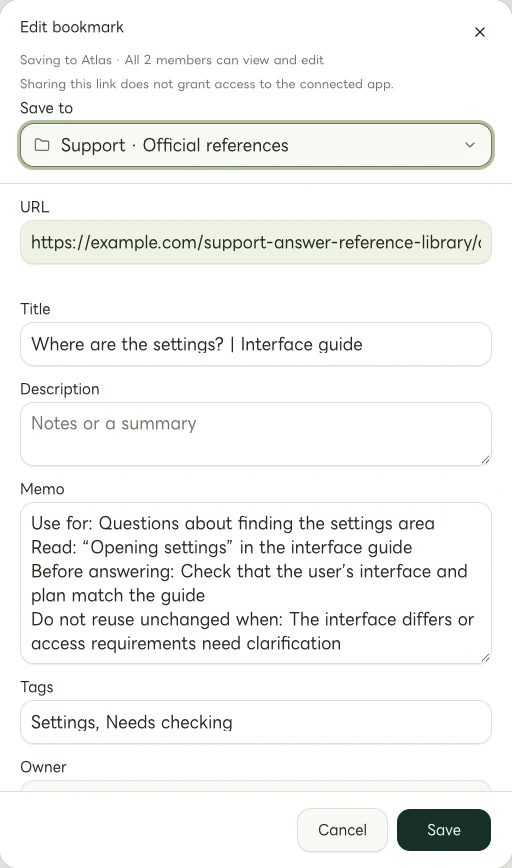
Actual Web edit dialog showing a fictional example.com link. The memo and tags are examples of manually entered information.
Reopen the source before answering
A guide that matched the product when it was saved can become outdated after an interface change. Do not rely only on the memo’s check date. Open the original and verify that:
- The guidance covers the interface or feature in the current question
- Plan and usage conditions have not been overlooked
- The relevant section still contains the instructions you intend to use
- If you provide the link to someone, they can access its contents
An “I cannot use this” question does not establish its own cause. A similar example in a saved article is not proof of an outage or user error. Follow the official checks and use the team’s normal escalation route for uncertainty.
This workflow organizes reference URLs and your own notes. It does not complete an individual reply, send it, or manage the support case. Keep correspondence and case records in the appropriate systems your team already uses.
Make outdated guidance visibly outdated
If a resource moves, save the new URL as a new bookmark and identify it as the current reference. If you retain the old link for context, mark its title or memo “Old guidance · Do not use for replies” and point to the replacement. Update manual tags too.
A “Needs checking” tag is a cue for someone to review the source. Do not treat this workflow as automatic link-health or content-update monitoring. Assign any review dates or responsibilities through the team’s usual calendar or task process.
Start with one official page you have recently had to find more than once. Add one line for the question it answers and one for the check required before replying. The next person will know both why to open it and when to be cautious.
Related guides
Put the guide into practice.
Shared workspaces are included in the paid Team plan, from two seats.
See team plans and pricing