For you
Choose your next book by saving the reason you want to read it
If your list of books to read keeps growing, add one sentence about why you want to read each one. Saving that reason beside the introduction or review in linqlo lets you return to your own interests before gathering another round of recommendations.

Generated illustration of selecting one book from a shelf. It is not a recommendation or depiction of actual titles.
Start with your question or mood
Some books reach the list through a review, others through a friend's recommendation or an intriguing table of contents. By the time you choose one, the details behind that initial interest may have faded.
Write the reason in your own words: “I want ideas for explaining a proposal more briefly” or “I want a story that takes me away from work.” Practical usefulness is only one reason to read. Curiosity, relaxation, and a question you want to consider slowly are useful criteria too.
Your purpose can change. The note records what interested you now so that you can make a more informed choice later.
Keep an entry point to the book and the reason it caught your attention
A publisher's book page can provide a useful place to check the title, author, edition, and format. If there are similar editions or a revised version, note which one you mean.
If a review prompted your interest, keep that URL when it adds something useful. Give the two pages different jobs: the book page for checking details, the review for revisiting the point that caught your attention. Keep the reviewer's assessment distinct from your own experience of a book you have not yet read.
Create a “Next books” collection in linqlo and save the URLs. Then edit the title and “Memo” fields. Names such as “Title and author | book page” and “Title | review that interested me” make the roles easy to distinguish. You do not need several links for every book, only the ones you expect to revisit.
If the contents are available, check which chapter might connect to your purpose. If they are not, leave “Check contents” as an open question. An expectation based on an introduction is not yet something you know about the whole book.
Three candidates do not need a single ranking
Consider fictional candidates A, B, and C. These examples illustrate reading reasons, not reviews of real books or claims about their quality.
Candidate A relates to current work. Its memo says: “Read because: I want to explain a proposal more briefly. Check: whether the contents include a chapter on structuring an explanation. Fits now: before starting next week's draft.” Checking for the relevant topic helps keep the expectation grounded.
Candidate B is a story for a change of pace. The note reads: “Read because: I want a weekend away from work material. What caught my attention: the setting described in a review. Check: revisit the introduction for a sense of the mood.” Judging it by the same work-related criteria as A would miss the reason it is on the list.
Candidate C explores a subject you want time to think about. Write: “Read because: I want background for a possible future project. Can wait because: the project is not yet defined.” Knowing when it becomes relevant can save you from reconsidering it at every choice.
These candidates do not need a shared score. A may suit a work-related question, B a quiet weekend, and C a later period of focused thinking. The collection helps you see when each book belongs in your life.

Generated illustration using three differently colored books to represent reading candidates. It does not show actual titles or automatic recommendations.
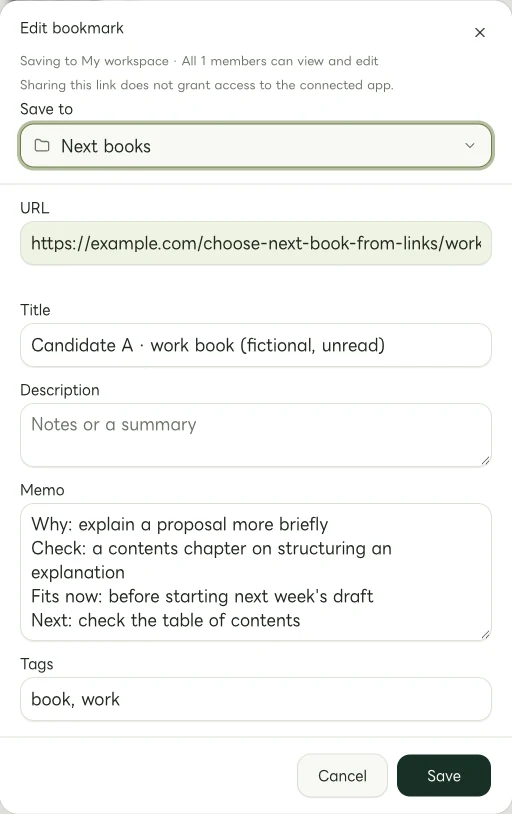
Actual Web edit dialog showing a fictional example.com link. The memo and tags are examples of manually entered information.
On choosing day, revisit what you want from reading now
Before opening the list, ask what kind of reading you want. Do you have a question to solve, want to settle into a story, or expect to read in short sessions? Match that answer to the notes you already left.
Update the reasons if circumstances changed. If Candidate A was connected to a project that is now finished, its urgency may have passed. You need not turn an old recommendation into an ongoing obligation.
A manually applied “read-next” tag can mark the chosen book. Treat it as a label you change yourself, rather than an automatically updated record of progress. When you decide to buy or borrow, check the edition, format, availability, and conditions at the original source. An earlier memo is not current inventory information.
If you are still undecided, reopen the introduction and ask whether it connects to what you want now. Give your saved reasons a chance to help before searching for another list of recommendations.
Leave a line for your future self
After reading, you can keep a short note about when you would return: “Revisit this chapter before explaining a proposal” or “Remember this when I want a change of pace.” It does not need to become a full review.
You can also record a mismatch before finishing. Keep the original reason for saving the book separate from your experience of reading it. Over time, that distinction can help you recognize what you actually enjoy or use.
Start with one book page and two lines: why you want to read it and what you still want to check. You can make the next choice clearer without reducing the whole list first.
Related guides
Put the guide into practice.
Create a free account to get started. No credit card needed.
Start organizing for free