For your team
Leave the reasoning beside your project handover links
A project handover is easier to use when each link explains the current state and the reason behind it. In linqlo, gather the approved specification, deferred options, and references for the next checks, then state what remains undecided.

AI-generated illustration, not a real project or the linqlo interface.
The links are there, but the same questions return
“Was this option approved?” “Why did we choose this scope?” A successor needs more than document locations. When a draft and an approved specification look equally current, it is hard to know where to begin.
Consider a fictional website update changing hands. The first release updates an information page. Additional languages will be considered later, and the remaining work is checking the page before release. The handover needs three useful starting points, rather than a directory of everything the company has ever written.
Create “Information page update · Handover” in a team workspace the successor already has access to. Think about the first decisions they will need to make before collecting references.
Separate approved work, deferred ideas, and the next check
Use titles that explain each reference’s role:
- Approved scope | First-release information page: the current basis for the work
- Deferred option | Additional languages: an idea that is paused, not discarded
- Before release | Layout and links: the reference for the remaining checks
Save the URL, then edit the bookmark, or choose “Detailed entry” while adding it, to set the title and “Memo.” If you use “Approved,” “Deferred,” or “Needs checking” tags, agree on their meaning and maintain them manually.
“Additional languages are unnecessary” is a different decision from “Additional languages are outside this release.” A deferred option needs a reason and a condition for reconsidering it. Otherwise, the next person may restart a discussion that already has a useful history.
Put the reason and remaining conditions beside “approved”
A memo for the approved specification might look like this. The decision, date, and project are fictional:
State: Approved; the working basis for the first release
Reason: This phase prioritizes updating information for existing users
Evidence: “Scope” in the linked specification and its linked decision record
Excluded for now: Additional languages; this is not a decision that they are unnecessary
Still to check: Small-screen layout and the contact link
Ask: The existing team’s release decision-maker; use the normal team directory
Information as of: 2026-10-03
Next reference: “Before release | Layout and links”
Use the memo to point back to an agreed specification or decision record. It should not create a new decision by implication. A short explanation and a reliable source are easier to maintain than a duplicate of the full discussion.
For the deferred option, add what would trigger a review: “Revisit once the next phase’s languages and scope are agreed.” For the release-check reference, write “Layout checks not yet performed” if that is the actual state. A link to a checklist is not evidence that its checks have been completed.

AI-generated conceptual illustration, not an approval or task-progress screen.
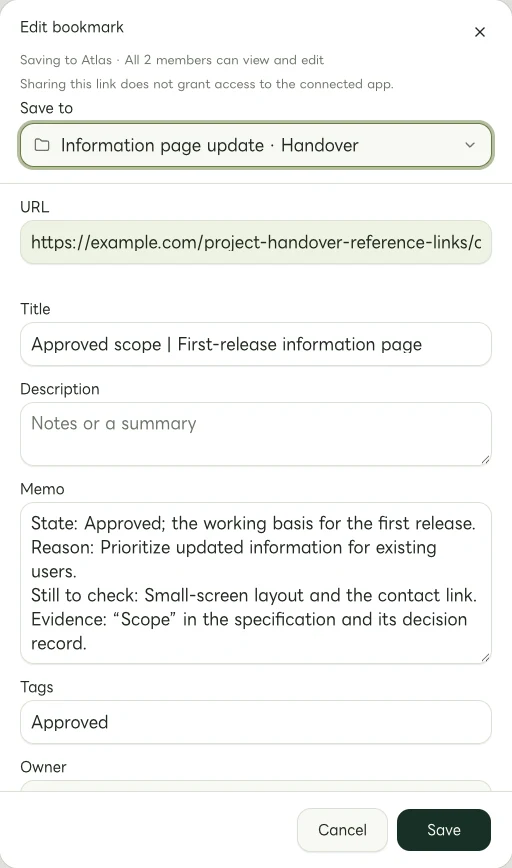
Actual Web edit dialog showing a fictional example.com link. The memo and tags are examples of manually entered information.
Let the next person walk through their first five minutes
After explaining the handover, ask the successor to start at the collection and find the reference for their next action. Can they answer these three questions?
- Which document is the current basis for the work?
- What is still undecided?
- Where should I look or ask when something is unclear?
If they discover that they cannot open the design document needed for a layout check, you have found a real gap. Check source-document and administration-tool access with their respective owners. Saving a link in linqlo does not transfer access to its destination.
Keep passwords, secret keys, and temporary sign-in URLs out of the memo. Handle customer information and private contact details only in appropriate existing systems, with a clear need and suitable access. This collection provides directions to materials the team is already authorized to use.
Agree on what happens after the handover
Decide through your normal team conversation who will keep the notes current. A tag does not notify an assignee or record an approval. Formal ownership, deadlines, and completion records should remain in the team’s usual process.
When the project finishes, you can manually add “Completed” to the collection name and note the completion date and final record. Make it clear that an old deferred idea is not necessarily a current task.
Open the most important handover link once more. A single sentence explaining the decision can help the next person recover the work behind the document, rather than just its location.
Related guides
Put the guide into practice.
Shared workspaces are included in the paid Team plan, from two seats.
See team plans and pricing