For you
Turn saved exhibitions into visits you can actually make
When you save an exhibition, record a day you could actually go, alongside its closing date and the official place to check entry details. Keeping those links and short notes in linqlo helps you move from an interesting exhibition to a workable visit.

AI-generated editorial image of an imagined gallery. It does not depict a real exhibition, artwork, or the linqlo interface.
An exhibition can still be open while being impossible for you to visit on your free day. It might be closed that day, or require a timed ticket you have not checked. A closing date is useful, but it needs to be paired with a possible visit date.
Save the official page for the right venue
A social post or review can preserve what interested you about the work. For planning, also save the organizer's or venue's official exhibition page. A direct page for that exhibition is usually a more useful starting point than a general homepage.
If it is a touring exhibition, include the venue in the bookmark title. Dates and entry arrangements can differ between locations. “Exhibition name | My venue | Official page” helps keep information for another city out of your plan.
Use public information pages for the shortlist. You do not need to put individual ticket links, QR codes, or booking references into it. If you want to record that you have booked, note the status and keep the actual ticket according to the issuer's instructions.
Three exhibitions, two free days
Here is a hypothetical planning example using an imaginary month. All exhibitions, dates, and entry conditions are invented. Suppose you are free on the 12th and the 19th.
| Candidate | Fictional conditions | What to check next |
|---|---|---|
| A, photography | Ends on the 15th; open on the 12th in this example | Opening hours and entry arrangements for the 12th |
| B, everyday objects | Ends on the 30th; closed on the 12th | Whether it is open on the 19th |
| C, architecture | Runs into the next month; timed booking required | Availability and booking terms for your preferred slot |
This is an editorial planning example, not current exhibition information or a linqlo calendar screen.
For A, investigate the 12th first: waiting until the 19th would miss its fictional run. Remove the 12th from B's possibilities and check the 19th. C has a longer run, but you still need to check whether you can book the time you want.
A list containing only closing dates would not make these differences obvious. Adding “Possible visit” and “Still to check for that day” tells you which page to open next. Allow time for travel and looking at the work before trying to fit several exhibitions into one day.
Write the note that leads to a decision
Create a linqlo Collection called “Exhibitions to visit” and save the official-page URLs. Choose “Detailed entry,” or edit after saving, to add titles, Memo entries, and any tags you need.
A's note could be:
Exhibition and venue: A, photography, at an invented venue. Run: ends on the 15th in this example. Possible visit: the 12th. Check: opening and last-entry times for that date, plus entry arrangements. Next: confirm on the official page, then add the visit to my calendar.
When copying dates, closure days, or booking requirements into Memo, include the source and the date you checked. A general “Closed Mondays” statement may have exceptions. Look up the actual date you intend to visit in the venue's information.
Use manual tags such as “Choose a day” and “Check booking” if they help you see the next action. This workflow does not automatically send deadline alerts or add calendar events. Once you have chosen a date, put it into the calendar you normally use and set any reminder there yourself.

AI-generated editorial image for thinking about exhibition references and plans. It does not show a real exhibition or purchased tickets.
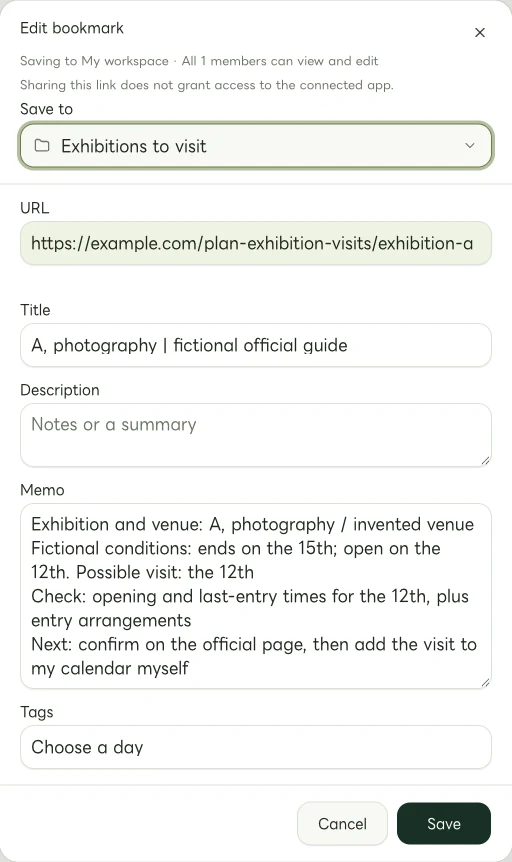
Actual Web edit dialog showing a fictional example.com link. The memo and tags are examples of manually entered information.
Recheck before you leave
The day before, or before setting out, reopen the official exhibition information and the venue's notices. Check for unexpected closures or changes, opening and last-entry times, entrances, and how your booking works. Check current prices and cancellation conditions when you book or buy too.
If one particular work is the reason you want to go, mention that in your note. Where the official information lists display changes or different display periods, check that the work is scheduled for your visit.
Start with one exhibition. Save its official page and write one date you could go. That small choice gives your saved link a practical next step.
Related guides
Put the guide into practice.
Create a free account to get started. No credit card needed.
Start organizing for free