For you
Organize pet care links with notes
Save URLs for veterinary clinics, vaccine and checkup schedules, pet insurance comparison pages, pet food and supply reviews, training and behavior articles, grooming salons, boarding facilities and pet hotels, municipal pet registration and license pages, emergency animal hospitals by category, and find them quickly when you need them. Record vet appointment dates, vaccination schedules, and notes in memos, and filter by tags like "vet," "vaccine," "insurance," "food," "training," or "grooming." This is for organizing pet care and pet ownership resource links, not for human childcare, not for product price/size comparison shopping, not for veterinary EMR systems, not for pet booking marketplaces, not for automatic syncing with pet apps, and not for permanent page archiving.

What you need
Set up a linqlo account and a device with internet access. First, verify that you can select the same workspace in the web version. The Free plan has a storage limit of 500 items. Check the remaining capacity and current pricing on the pricing page.
Example
A collection called "Pet Care" containing your regular veterinary clinic, vaccine schedules, pet insurance comparison sites, food and supply review articles, training and behavior information, grooming salons, pet hotels, municipal pet registration pages, and emergency animal hospital URLs. Tags like "vet," "vaccine," "insurance," "food," "supplies," "training," "grooming," "boarding," "government," "dog," and "cat" help you find the information you need quickly. Record vet appointment dates, vaccination schedules, grooming appointments, notes, and your pet's reactions in memos.
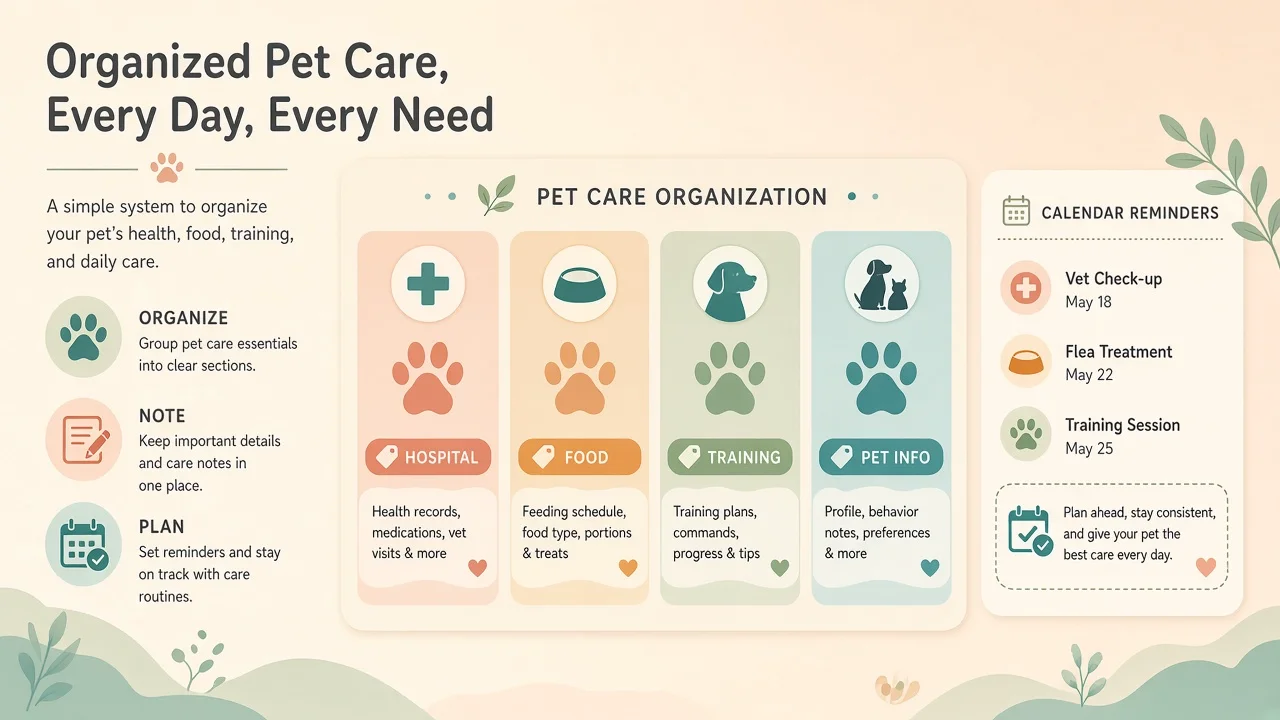
Explanatory illustration showing pet care information and schedule memo organization (sample data for illustration).
The cover image and the editing screen above are explanatory illustrations for demonstration purposes. These are not actual product screenshots, but illustrative diagrams with enlarged operation areas, numbers, and arrows added, displaying fictional sample data.
Steps
1. Create a collection for pet care
Create a collection named "Pet Care" or "Pet Health Management" to organize pet care-related URLs.
2. Save pet care URLs
Save 3–5 URLs for your regular veterinary clinic, vaccine and rabies shot schedules, periodic checkup information pages, pet insurance comparison sites or insurance company pages you're considering, pet food and supply reviews, training and behavior information sites or videos, grooming salons, pet hotels or boarding facilities, municipal pet registration and license application pages, and emergency animal hospitals or after-hours clinics. Save by pasting the URL and verify that the page title appears in the list.
3. Tag by category and pet type
Add tags like "vet," "vaccine," "insurance," "food," "supplies," "training," "grooming," "boarding," "government," "emergency," "dog," "cat," or "rabbit." Apply multiple tags to the same page to make filtering easier later.
4. Record dates and key points in memos
Record vet appointment dates, vaccination schedules, next checkup timing, grooming appointment dates, boarding reservation dates, insurance enrollment deadline, clinic hours, holidays, items to bring, special notes, your pet's condition or reactions, ingredients in foods you're interested in, and training tips. Leave cues like "rabies shot 4/15," "annual vaccine next month," "grooming booked 10/5," or "food sample approved" to help you next time.
5. Filter by tag and open when needed
Filter by the "vet" tag to find your regular clinic or specialists, check "vaccine" for upcoming vaccination schedules, compare "insurance" enrollment candidates, or read "food" reviews for products you plan to purchase. Open the original page to check the latest information.
When you can't find or save
If you can't find an item after saving, check your account, workspace, and collection in that order, remove any unnecessary search or tag filters, and reload the list. If you see a failure message or disconnection, verify that the same URL isn't already saved before retrying. If you're not logged in, log in and then recheck the save destination and URL. If shared content doesn't reappear, copy the URL again from the original site and add it manually.
Capabilities and limits
This is for organizing pet care and pet ownership resource links. It does not support human childcare, product price/size comparison shopping, veterinary EMR systems, pet booking marketplaces, automatic syncing with pet apps, importing medical records, automatic vaccine history management, or auto-saving health records. Save URLs for publicly available veterinary clinic information, vaccine schedules, pet insurance comparison sites, food and supply reviews, training information, grooming salons, pet hotels, and municipal pet registration pages, and open the original page when needed to check the latest information. This is not permanent archiving of page content, so if the site operator deletes or updates information, the URL may become inaccessible. Veterinary clinic hours, holidays, vaccine availability, and grooming salon booking status change frequently, so always check the original site for the latest information before visiting or making reservations.
FAQ
Can I automatically import information from pet health tracker or veterinary apps?
No. This guide covers saving and organizing pet care resource URLs. There is no automatic sync with specific pet health management apps or veterinary clinic apps. Save URLs individually for information you find useful.
Will pet information stay permanently once saved?
This guide covers saving and organizing URLs. If veterinary clinics, pet insurance companies, or municipalities delete, update, or change the public access of information, the URL may become inaccessible due to changes on the original site. This is not permanent archiving of page content.
Can I get automatic vaccination reminders or health record auto-saving?
linqlo is not a pet health management app. This guide covers organizing pet care resource links and simple recording via memos. If you need detailed vaccine management, health records, or automatic reminders, use it alongside a dedicated pet health tracker app or veterinary clinic app.
Can I share a pet care collection with my family?
Yes. If your pricing plan supports team features, you can share collections with specific people. However, this guide focuses on organizing personal pet care information. See the pricing page for details on collaboration features.
Getting started and related guides
If you're not registered, you'll need to create an account. If you're already logged in, verify your workspace before starting.
Put the guide into practice.
Create a free account to get started. No credit card needed.
Start organizing for free